You’re doing the same analysis over and over again. Every time you evaluate a new stock, you explain what ROIC means. You remind the AI to pull data from SEC filings, not Yahoo Finance. You specify that you want segment-level breakdowns, not just consolidated numbers. You ask for the same output format you’ve requested dozens of times before. By the time you’ve typed all your instructions, you’ve spent 10 minutes setting up a conversation that should take 2 minutes. And next week, you’ll do it all again. Claude Projects solves this problem. Think of it as creating a specialized analyst who already knows your methodology, your preferences, and your process. You build the workflow once and reuse it whenever you need that type of analysis. Here’s how to stop repeating yourself and start analyzing companies faster. The Problem: Context Resets Cost You TimeEvery new AI conversation starts from zero. The AI doesn’t remember that you prefer operating margin to net margin. It doesn’t know you want three years of data, not five. It doesn’t recall analyzing competitive positioning before looking at financials.
For one-off questions, this is fine. For systematic investment analysis, it’s inefficient. Most investors solve this with copy-paste. They keep a document of standard prompts and paste them into each new conversation. This works, but it’s clunky. You’re still manually assembling context every time. The real cost isn’t the typing. It’s the cognitive load of remembering what to include and the friction that makes you skip useful analysis steps because they’re annoying to set up. The Solution: Projects as Persistent Analytical FrameworksClaude Projects let you save custom instructions that apply to every conversation within that Project. Create a Project called “Initial Stock Screening,” provide instructions for your screening methodology, and ensure every conversation in that Project starts with that context already loaded.
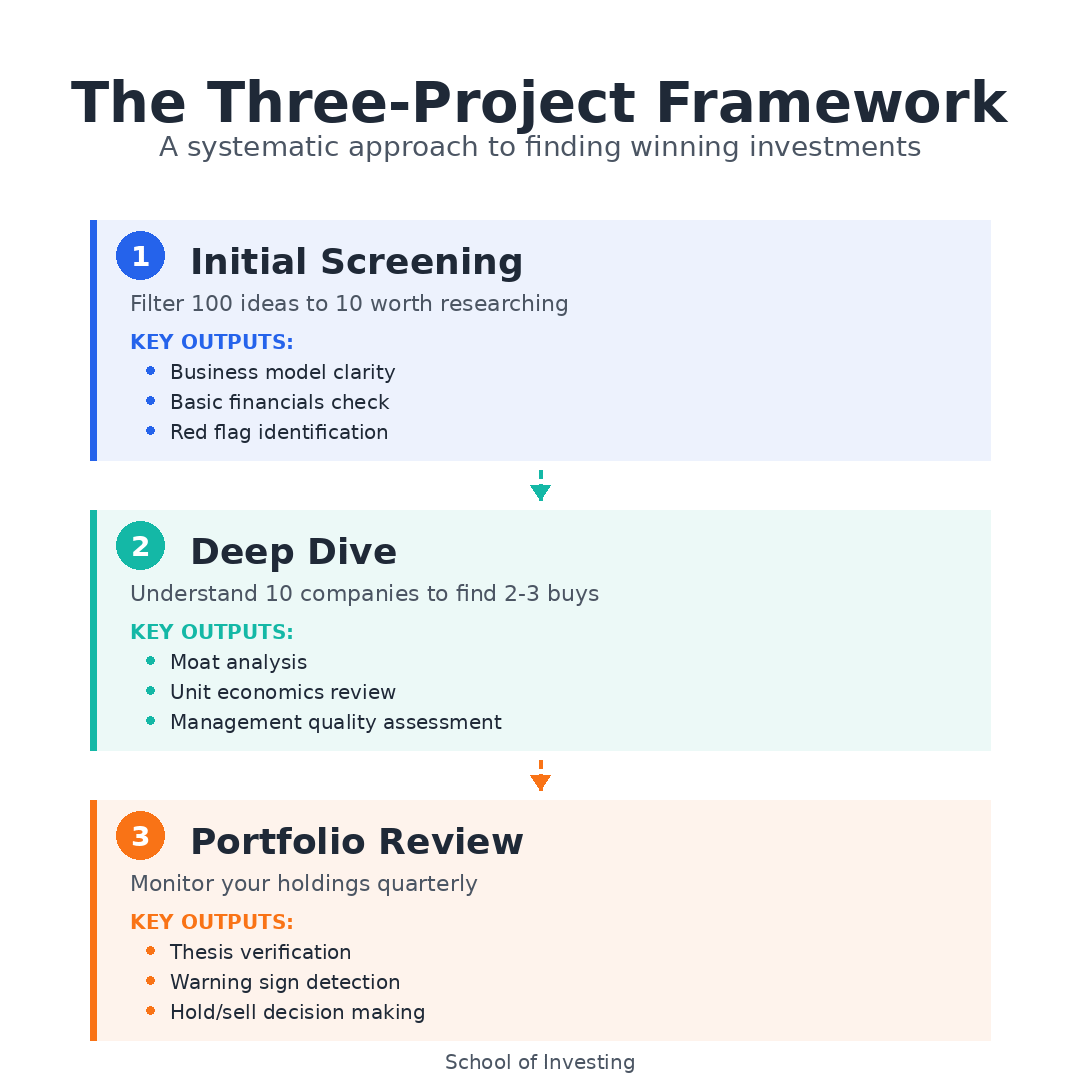
You’re not teaching the AI how to help you. You’re working with an analyst who already knows the job. The key insight: different analysis tasks need different contexts. You don’t want the same instructions for quick screening, deep competitive analysis, and portfolio reviews. So you create multiple Projects, each tuned for a specific workflow. Three Core Investment WorkflowsWorkflow 1: Initial Screening AnalysisWhat this handles: First-pass evaluation when a company hits your radar. You need basic financials, a business model overview, and red flags identified quickly. Custom instructions for this Project: How to use it: Drop a company name into a new conversation. The AI already knows to structure the analysis the way you want it. You get consistent output every time, which makes comparing companies easier. If you’re screening five companies in a sector, you can open five conversations in this Project and get parallel analysis in the same format. What this replaces: Those 3 AM research sessions where you’re clicking through Finviz, Seeking Alpha, and SEC filings trying to piece together whether a company is worth your time. Now you get a structured first pass in minutes. Workflow 2: Deep Dive Competitive AnalysisWhat this handles: After a company passes initial screening, you need to understand competitive positioning, moat durability, and unit economics. Custom instructions for this Project: How to use it: This Project handles the analysis that determines whether you actually buy the stock. You’re past “is this interesting?” and into “do I understand this business well enough to own it for years?” Start a conversation, name the company, and let the AI structure the deep dive. You’ll often go back and forth, asking for clarification on specific segments or requesting comparison to a competitor. What this replaces: The scattered notes across multiple documents where you’re trying to synthesize 10-K data, competitor comparisons, and management assessment. Everything flows through one structured analysis. Workflow 3: Portfolio Review Check-InWhat this handles: Quarterly review of existing holdings to catch deterioration early and verify your thesis remains intact. Custom instructions for this Project: How to use it: Every quarter, open conversations for each holding. You’re not doing deep analysis. You’re running a checklist: did anything important change? This keeps you from holding stocks on autopilot. If a company’s margins compress for two straight quarters, this workflow surfaces it before it becomes a disaster. What this replaces: The guilty feeling that you should be monitoring your holdings more closely but it’s too tedious to check every position every quarter. Now you have a systematic process that takes 10 minutes per stock. The content below is for paid subscribers. Above, we covered what Claude Projects are and how to set up a complete Initial Screening workflow. Below, I'll show you the exact Deep Dive and Portfolio Review workflows with detailed custom instructions, explain the limitations you need to understand, and provide a framework for building your own specialized Projects... Continue reading this post for free in the Substack app
|
Wednesday, February 11, 2026
How to Use Claude Projects to Build Reusable Investment Analysis Workflows







Subscribe to:
Post Comments (Atom)
No comments:
Post a Comment